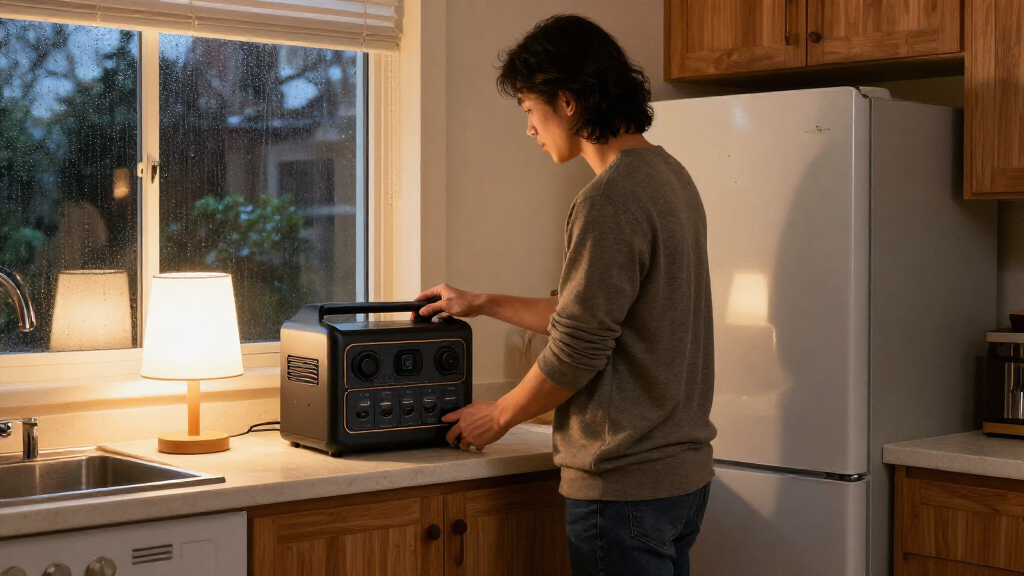
Use this guide to choose and prepare a portable power station for selected home essentials during a power outage. It is for homeowners and renters with basic household knowledge; no electrical work is required. You will estimate your needs, check a station’s capacity and output, prepare it before an outage, and connect devices safely. Allow 1–3 hours for planning and setup, plus any charging time required by the manufacturer.

Get backup power and energy gear delivered free with Prime
- Fast, free delivery on millions of items
- Prime Video, Amazon Music and more included
- Member-only deals all year

Jackery HomePower 3600 Plus & 2x200W Solar Panels, 3584Wh, 3600W AC Output
- ✔ Battery capacity: 3,584Wh
- ✔ AC output: 3,600W; 7,200W in parallel as stated
- ✔ Battery chemistry: LFP

Jackery HomePower 3600 Plus Power Station, 3584Wh, 3600W AC Output
- ✔ Battery capacity: 3,584Wh
- ✔ AC output: 3,600W; 7,200W in parallel as stated
- ✔ Battery chemistry: LFP

EBL 2400W Portable Power Station LiFePO4 Battery for Home Use
- ✔ Battery capacity: 1,843.2Wh
- ✔ AC output: 2,400W maximum
- ✔ Battery chemistry: LiFePO4
Difficulty: Beginner | Time: 1–3 hours for planning and setup
What You’ll Need
Tools & Materials:
- Portable power station with manufacturer’s manual
- List of devices you want to power
- Device labels or manuals showing watts or volts and amps
- Calculator or phone calculator
- Manufacturer-approved charging cable
Knowledge:
- Basic ability to read device power labels
- Ability to distinguish a standard plug-in device from a hardwired appliance
Choose plug-in essentials such as phones, lights, a router, or a small refrigerator. A portable power station is not a whole-home generator. Do not connect it to a wall outlet or home wiring through a homemade cable. Have a licensed electrician install any transfer equipment needed to power household circuits.
Jackery HomePower 3600 Plus & 2x200W Solar Panels, 3584Wh, 3600W AC Output
For a household that wants a substantial battery and a way to recharge it from sunlight, this is the most complete starting package in the group. The 3,584Wh capacity and 3,600W output exceed the EBL’s 1,843.2Wh and 2,400W, giving the Jackery more headroom for demanding devices and more stored energy for a longer outage plan. Two 200W solar panels are listed in this bundle, though the product notes that the station and panels may ship separately.Its stated expansion options add a path beyond the capacity of the other entries: Jackery lists expansion to 21kWh per unit and up to 43kWh with multiple units. Those figures describe a larger system, not the included station alone, so buyers should confirm the extra equipment and setup required. The listing also describes 240V operation in parallel, which may help with compatible home loads when properly configured. We should not assume that plugging the station into a standard outlet powers household circuits; the listing refers to pairing it with an MTS for home backup.The tradeoff is size and handling. At 77.2 pounds, this is heavier than the EBL, although wheels and a telescoping handle make it rollable. Its solar bundle is the practical differentiator from the standalone Jackery listing, but it is still a large unit to position and store. This pick makes the most sense when the included panels fit our recharge plan and we value capacity over lifting convenience.
Pros:
- 3,584Wh capacity and 3,600W output provide the highest listed baseline in this comparison.
- Includes two 200W solar panels for a solar-recharging option.
- Stated expansion supports larger backup systems over time.
- Wheels and a telescoping handle help move its 77.2-pound frame.
Cons:
- The station and solar panels may arrive in separate packages.
- Expansion and parallel capabilities require additional equipment and compatible setup.
- The listed weight makes lifting and stair transport less convenient than with the EBL.
Best for: Households seeking a higher-capacity starting setup with solar panels included and a stated path to expand.
Not ideal for: Buyers who need a lightweight unit to carry up stairs, or who want a simple plug-in solution for household circuits without checking transfer equipment.
Bottom line: Choose this bundle when we want the strongest listed capacity here and value having two solar panels in the package.
“Choose this bundle when we want the strongest listed capacity here and value having two solar panels in the package.”
Jackery HomePower 3600 Plus Power Station, 3584Wh, 3600W AC Output
This standalone listing offers the same core Jackery specifications as our overall pick: 3,584Wh capacity, 3,600W output, LFP chemistry, and stated expansion options. That makes the choice between the two Jackery entries less about the power station and more about the package. Here, solar panels are optional; buyers can select compatible panels separately or start with AC charging, while the bundled version includes two 200W panels.For home backup, the capacity and expansion story are compelling on paper. Jackery says the system can expand to 21kWh per unit or 43kWh across multiple units, with 240V available in parallel. Those larger configurations could address needs beyond a single portable station, but they involve added equipment and setup. The listing also describes pairing the station with an MTS. We should confirm the necessary components and supported circuits before treating it as a home backup system.At 77.2 pounds, it shares the bundled model’s portability tradeoff: wheels and a telescoping handle help on level floors, but it is not a light carry. Compared with the EBL, it offers nearly double the stated energy capacity and higher output, but is heavier and larger. Compared with the solar bundle, it avoids paying for panels we may not need in our initial setup. Choose it when we want the Jackery’s battery platform and prefer to decide separately how to recharge it.
Pros:
- Matches the bundled Jackery’s 3,584Wh capacity and 3,600W output.
- Solar is optional, allowing a separately chosen recharge setup.
- Stated expansion and parallel operation offer a path to larger systems.
- Wheels and a telescoping handle ease rolling despite the unit’s weight.
Cons:
- Solar panels are not included in this listing.
- Its 77.2-pound weight is substantially more than the EBL’s listed weight.
- Home circuit backup requires checking MTS and installation compatibility.
Best for: Buyers who want the Jackery’s 3.6kWh-class station but plan to select solar panels or other charging equipment separately.
Not ideal for: People who want panels included from the outset, or anyone who needs a lighter station for frequent lifting and carrying.
Bottom line: Pick the standalone HomePower 3600 Plus when we want the same high-capacity station as the bundle but want to choose solar equipment separately.
“Pick the standalone HomePower 3600 Plus when we want the same high-capacity station as the bundle but want to choose solar equipment separately.”
EBL 2400W Portable Power Station LiFePO4 Battery for Home Use
The EBL Acc2400 is the compact-capacity choice in this comparison. Its 1,843.2Wh battery and 2,400W AC output can make sense for a defined set of essentials, such as phones, laptops, lighting, and selected appliances, provided their combined draw stays within the station’s limits. It lists four AC outlets and enough additional ports to charge up to 12 devices, giving users more direct connection choices than the Jackery listings report in their supplied specifications.Portability is its clearest advantage over both Jackery options. At about 54 pounds, it is lighter and smaller, with dual side handles. That can matter when moving backup power between a storage area and living space. Its stated 0.1-second emergency power mode may help protect connected computers during an outage, although buyers should verify the supported backup behavior and device compatibility before relying on it for sensitive equipment.The tradeoff is straightforward: it has roughly half the Jackery’s capacity, lower output, and no listed expansion path. That limits how long it can run loads and how much we can add later. The EBL is a better fit than either Jackery when the outage plan is modest and moving the unit matters; it is a weaker fit for extended outages, high-draw appliances, or a system intended to scale. Its listed solar charging speed and input limits are not provided, so we should confirm those details if solar recharging is central to our plan.
Pros:
- Lighter and smaller than either listed Jackery station.
- 2,400W output and 1,843.2Wh capacity suit a focused set of backup loads.
- Four AC ports plus USB, DC, car, and wireless charging options.
- Manufacturer-listed 0.1-second emergency power mode for supported connected devices.
Cons:
- About half the Jackery’s listed capacity, limiting potential runtime.
- Lower AC output and no expansion capacity are listed.
- Solar input limits and charging times are not specified in the supplied details.
Best for: People building a portable backup kit for electronics and selected appliances who value easier handling over maximum stored energy.
Not ideal for: Households expecting longer runtimes, planning to power multiple demanding appliances, or wanting an expandable system.
Bottom line: Choose the EBL when easier movement and a focused essentials plan matter more than the Jackery’s greater capacity and expansion options.
“Choose the EBL when easier movement and a focused essentials plan matter more than the Jackery’s greater capacity and expansion options.”
As an Amazon Associate we earn from qualifying purchases.
Before You Start
Check the manual first. Confirm the station’s permitted charging methods, operating temperature range, output limits, and instructions for indoor use. Keep it dry, ventilated, and away from heat. Never use a fuel-burning generator or other combustion device indoors or near open windows; those devices can produce deadly carbon monoxide.
Do not plan to power medical equipment as its only backup unless the equipment provider and station manufacturer confirm compatibility and the runtime meets your needs. Arrange a reliable backup plan with your medical provider.
Step-by-Step Instructions
Step 1: List the devices you need
Write down the plug-in devices you want during an outage and rank them by priority. Include only essentials, such as a phone, LED lamp, internet router, or refrigerator. Note each device’s rated watts from its label or manual. If the label gives volts and amps instead, multiply volts by amps to estimate watts.
Tip:Some devices draw more power when they start. Refrigerators, pumps, and compressors can have a startup surge; check their manuals or ask the manufacturer for the starting wattage.
Check: You have a prioritized list with a wattage estimate and any known startup surge for each device.
Step 2: Estimate the energy you will use
For each device, multiply its watts by the number of hours you expect to use it. The result is watt-hours (Wh). For example, a 10-watt lamp used for 5 hours uses about 50 Wh. Add the estimates for devices you expect to run during the same period.
For a refrigerator or other device that cycles on and off, estimate its daily energy use from the product label or manual when available. A running-watts figure alone may overstate or understate its real daily use.
Tip:Battery energy is lost during conversion, and usable capacity varies by model and operating conditions. Leave a margin above your calculated needs and use the manufacturer’s runtime guidance.
Check: You have a rough Wh estimate for your planned outage period, plus a margin for conversion losses and changing conditions.
Step 3: Match the station to your needs
Compare your device list with the station’s specifications. Check two separate limits: battery capacity in Wh for how long it can supply energy, and continuous output in watts for how much power it can supply at once. Confirm that the total load you intend to run at the same time stays within the continuous output limit, and that startup surges stay within the station’s surge rating.
Check that the station has the right outlet type, voltage, and charging options for your devices. Review its battery chemistry, warranty, operating temperature limits, and any stated restrictions on powering refrigerators or medical devices.
Tip:A larger Wh rating does not automatically mean the station can start a high-surge appliance. Capacity and output are different specifications.
Check: Your chosen model has enough usable capacity for your estimated use, adequate continuous and surge output, and compatible outlets.
Step 4: Prepare and charge the station
Place the station on a stable, dry surface with the clearance and ventilation specified in its manual. Charge it using an approved method, such as its supplied wall charger or a manufacturer-approved solar setup. Check the display or indicator to confirm charging has finished, then store the unit within the manufacturer’s recommended charge range and temperature.
Tip:Do not cover vents, charge a wet unit, or leave it in a hot vehicle. Follow the manual’s advice for long-term storage and periodic recharging.
Check: The display shows the expected charge level, the unit has no warning indicator, and it is stored in a safe, accessible location.
Step 5: Make a simple outage plan
Choose a ventilated, dry location near the devices you plan to power, with cables routed so people will not trip. Decide which devices will run together and which will take turns. Keep the manual, charging cables, and a flashlight nearby. Tell household members how to check the battery display and turn the station off.
Tip:Do not place the station where water could reach it, such as beside a sink or in a damp basement. Keep it away from children and pets if the manufacturer advises restricted access.
Check: Household members can find the station, its manual, and cables, and understand which devices have priority.
Step 6: Connect devices during an outage
Turn off or unplug nonessential loads. If the station is not already on, start it as directed in the manual. Connect one device at a time to the correct outlet, then check the display for load and remaining runtime. Keep the combined load within the station’s ratings. Switch off devices when they are not needed, and use lower-power settings where practical.
For a refrigerator, follow its manual’s guidance and monitor the station’s load and battery level. Keep refrigerator doors closed as much as possible. Never plug the station into a wall outlet to feed power back into household wiring.
Tip:If the station reports an overload, disconnect devices and reconnect them one by one, beginning with the highest-priority low-power device. Do not repeatedly reset it while the overload remains.
Check: Connected devices operate normally, the station shows no overload or temperature warning, and the remaining runtime is visible.
Step 7: Recharge and restore the setup
When grid power returns, disconnect devices and recharge the station according to its manual. Check for damage, moisture, unusual heat, or warning indicators. Once charged, return the unit and cables to their storage place and update your device list if your needs have changed.
Tip:If the station, cable, or outlet looks damaged, smells unusual, or becomes excessively hot, stop using it and follow the manufacturer’s support instructions.
Check: The station is recharged or scheduled for charging, inspected, and ready for the next outage.
Common Mistakes to Avoid
- Choosing a station by battery capacity alone. — Check continuous watt output and startup surge ratings as well as Wh capacity.
- Adding device running watts but ignoring startup surges. — Check the manuals for refrigerators, pumps, and other motor-driven appliances; verify the station’s surge rating can handle them.
- Assuming the station can power the whole home through a wall outlet. — Use the station’s own outlets for plug-in devices. Ask a licensed electrician about approved transfer equipment for circuits.
- Leaving the station discharged or stored in unsuitable conditions. — Follow the manufacturer’s storage charge and temperature guidance, and check the charge periodically.
Troubleshooting
Problem: The station shuts off or displays an overload warning.
Solution: Disconnect devices, check their combined running watts and startup surge, then reconnect only loads within the station’s ratings.
Problem: A refrigerator will not start even though its running watts appear low.
Solution: Its startup surge may exceed the station’s surge limit. Check the refrigerator’s manual and station specifications; use a compatible station or leave that appliance disconnected.
Problem: The displayed runtime is much shorter than expected.
Solution: Check the current load, reduce usage, and compare the display’s estimate with the actual device consumption. Cold temperatures, conversion losses, and battery age can affect runtime.
Problem: The station will not charge.
Solution: Confirm the outlet or charging source works, inspect the approved cable for damage, and follow the manual’s charging steps. Stop if the unit is wet, damaged, unusually hot, or showing a fault; contact the manufacturer.
What Success Looks Like
Your selected devices run from the station’s own outlets without overload or warning indicators. The station’s output ratings cover their combined load and startup needs, and its remaining battery level supports your planned use. The station, cables, and outage plan are stored ready for use, and no connection feeds power into home wiring.
Next Steps
Check the charge level and storage condition at the interval specified by the manufacturer. Recalculate your load if you add appliances or change your outage priorities. After each outage, recharge and inspect the station. If you need to power hardwired circuits, have a licensed electrician assess and install compatible transfer equipment.
Frequently Asked Questions
How large a power station do I need for home backup?
Add the energy use in Wh for the devices and hours you need, then allow for conversion losses and a margin. Separately confirm that continuous watts and surge watts cover the devices running together.
Can a portable power station run a refrigerator?
Some models can, if their capacity, continuous output, surge rating, and outlet match the refrigerator’s requirements. Check the refrigerator manual and the station specifications; monitor battery level during use.
Can I connect a power station to a wall outlet to power my home?
No. Do not use a cable that feeds power from the station into a wall outlet or home wiring. Use the station’s designated outlets, or consult a licensed electrician about compatible transfer equipment.
Can I recharge the station with solar panels during an outage?
Only if the station supports solar charging and the panels meet its input voltage, current, and connector requirements. Follow the manual, and expect output to vary with sunlight and weather.
Can a power station be used for medical equipment?
Use it only after the medical equipment provider and station manufacturer confirm compatibility and runtime. Keep an alternate backup plan, since battery runtime can change with load and conditions.